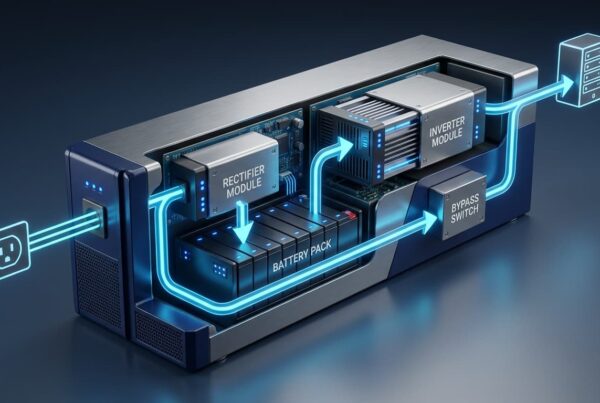


A UPS works by rectifying incoming AC power to DC to continuously charge an internal battery, then inverting that DC back into clean AC to power connected equipment. The moment mains power fails, it switches to battery-fed inverter power, instantaneously in online models or within milliseconds for standby types, keeping critical systems running until power is restored.
- A UPS relies on five core parts: rectifier, inverter, battery, static bypass switch, and control unit.
- It keeps equipment running by switching from mains to battery power the instant an outage, sag, or surge occurs.
- Three main types exist: standby, line-interactive, and online (double-conversion), each with a different transfer time.
- A UPS is not a generator or a surge protector; each one protects against a different risk.
- Proper sizing means calculating total load, required runtime, and adding 20 to 25% headroom.
- Most UPS batteries need replacing every three to five years, depending on operating temperature.
What is a UPS?
Understanding how a UPS works starts with what it actually is. A UPS, or uninterruptible power supply, is a device that sits between the mains power supply and your equipment, storing energy in a battery and releasing it the instant that supply is disrupted. Its job isn’t just to survive a blackout. A well-specified UPS also regulates voltage, filters electrical noise, and gives production equipment, servers, and control systems a stable platform to run on day to day.
For engineers and facility managers, that distinction matters. A UPS that only activates during a full outage delivers half its value. The other half comes from keeping power clean between outages, not just after them.
The 5 core components of a UPS
Most explanations of UPS technology stop at three or four parts. A complete UPS relies on five components working together, and understanding each one makes the rest of this guide, covering sizing, types, and troubleshooting, considerably easier to follow.
Rectifier and inverter: the double-conversion process
The rectifier is the component that converts incoming AC mains power into DC, which does two things at once: it charges the battery and feeds the inverter. The inverter is the component that converts that DC back into AC, shaped into a clean sine wave suitable for sensitive electronics rather than the raw, sometimes noisy waveform coming off the grid. In an online UPS, this path runs continuously. Every watt passes through both stages, all the time, regardless of whether mains power is stable. That’s why it’s called double conversion.
Battery: the energy reserve
The battery is the component that stores the DC energy the inverter draws on during an outage. Capacity determines runtime: a small internal battery might carry a server rack for ten to fifteen minutes, enough to shut down cleanly or hand over to a generator, while external battery cabinets extend that to several hours. Most UPS batteries need replacing every three to five years, depending on usage patterns and ambient temperature. Heat is the single biggest factor shortening battery life in tropical climates.
Static bypass switch and control unit: the safety net and the brain
The static bypass switch is the component that routes mains power directly to connected equipment if the UPS itself fails or needs maintenance, so a fault inside the unit doesn’t take your equipment down with it. The control unit is the component most explanations leave out: it coordinates the other four parts, monitoring voltage, battery state, and load in real time, and deciding when to switch modes. Without it, the other four components have no way of working together.
How a UPS switches to battery power
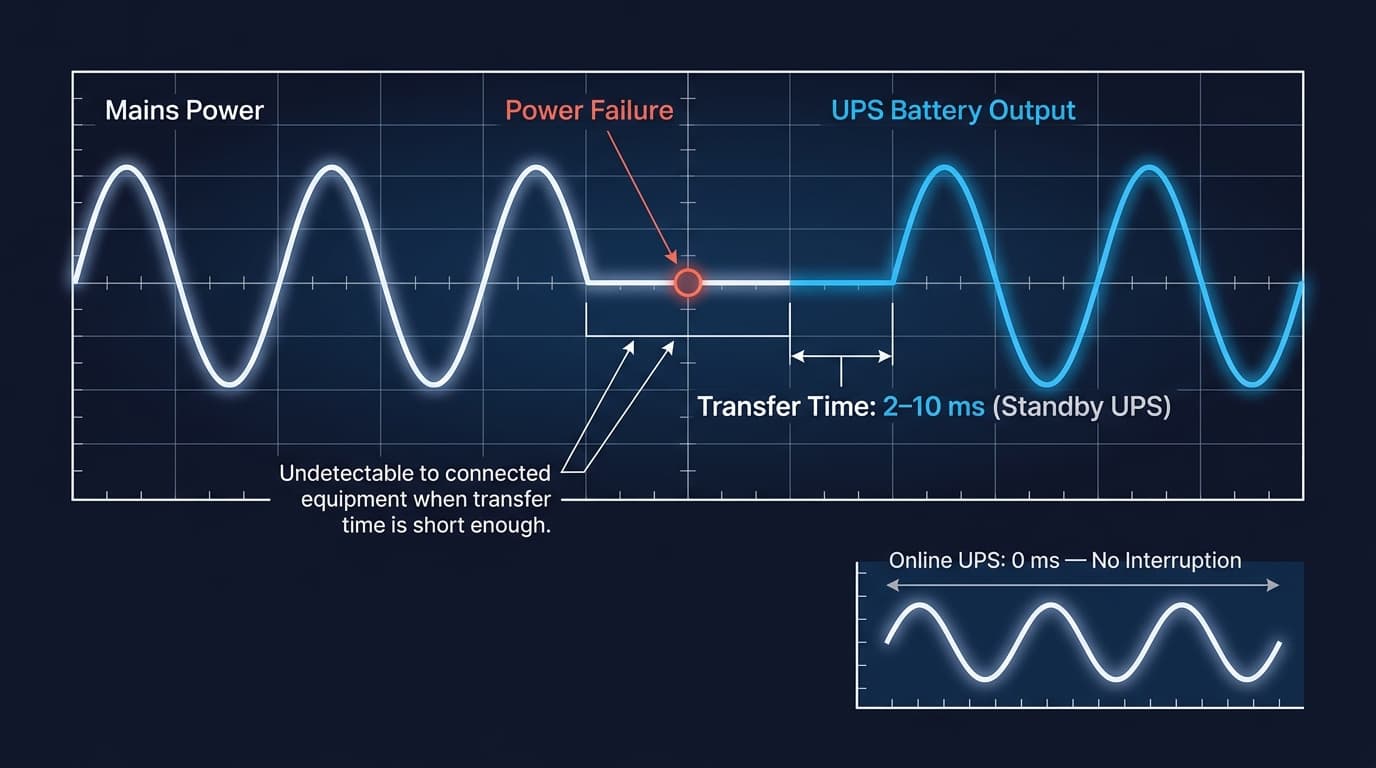
When mains power is within normal parameters, the rectifier and inverter handle the conversion described above, and the battery sits fully charged in reserve. The moment the control unit detects a dip, surge, or complete loss of mains power, it directs the inverter to draw from the battery instead of the rectifier. Connected equipment sees no interruption, because the inverter’s output doesn’t change; only its power source does.
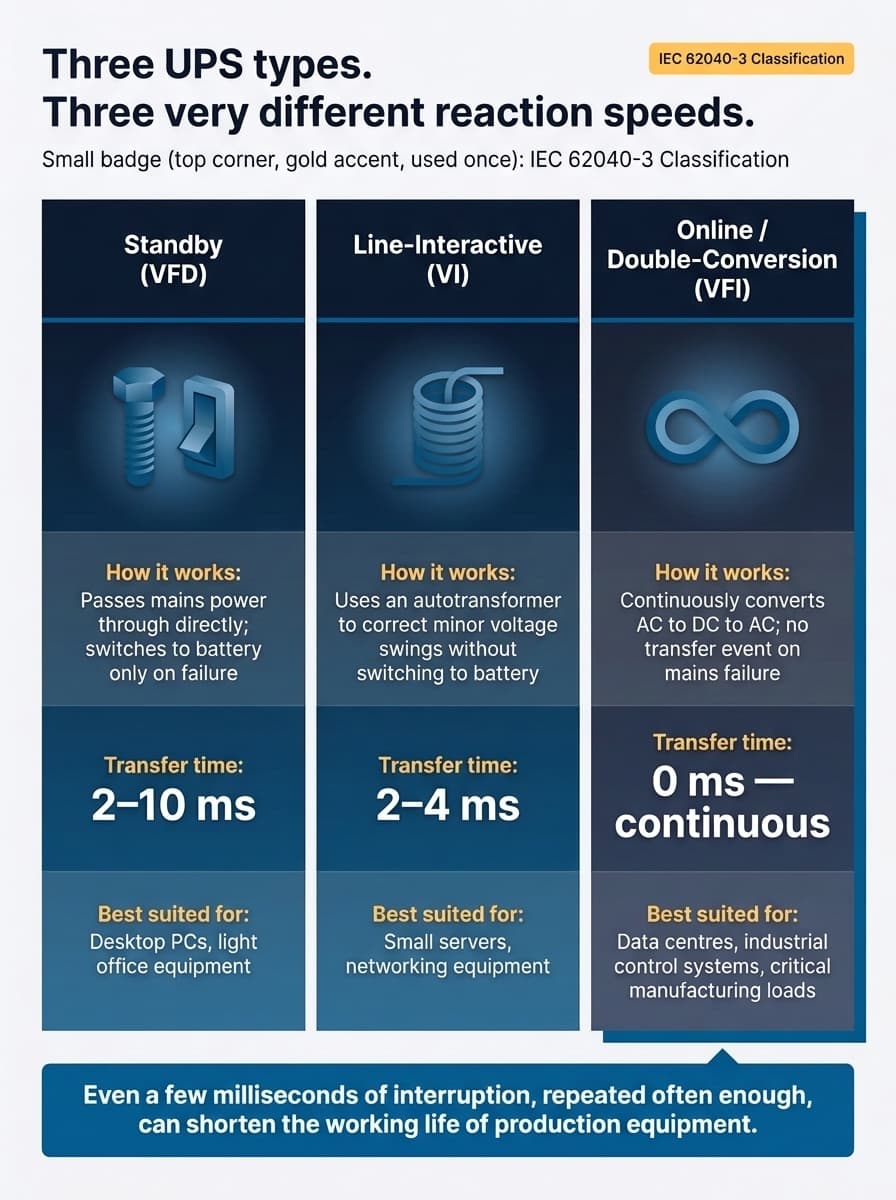
How fast that switch happens depends on the UPS category. According to IEC 62040-3 (2021), the international standard that classifies UPS behaviour, systems fall into three categories: VFD (voltage and frequency dependent, or standby), VI (voltage independent, or line-interactive), and VFI (voltage and frequency independent, or online double-conversion). A VFI system never really “switches” the way a standby unit does, because it’s already running through the inverter continuously. That’s the practical reality behind the phrase “zero transfer time.”
Why power quality protection matters
Complete blackouts are the most obvious threat, but they’re rarely the most frequent one. Brownouts, sudden drops in voltage, and surges or spikes in the opposite direction cause quieter, cumulative damage to sensitive equipment long before a full outage ever occurs. Electrical noise, interference riding on the supply itself, produces the kind of intermittent faults that are notoriously difficult to trace back to their source.
This is a large part of why power interruptions remain such a persistent cost centre for manufacturers, even in grids with generally reliable supply. For facilities where the recurring issue is voltage sag specifically, rather than a full loss of power, it’s worth understanding how Dynamic Sag Correctors compare with traditional UPS protection. The two technologies solve overlapping but distinct problems, and choosing the wrong one for your fault profile means paying for protection you don’t actually need.
Talk to an Engineer
Need help sizing a UPS for your load?
UPS types: standby vs line-interactive vs online
The three IEC categories translate into three practical product types, each suited to a different risk tolerance and budget.
| Type | How it works | Transfer time | Best suited for |
|---|---|---|---|
| Standby (VFD) | Passes mains through directly; switches to battery only on failure | About 2 to 10 milliseconds | Desktop PCs, light office equipment |
| Line-interactive (VI) | Uses an autotransformer to correct minor voltage swings without switching to battery | About 2 to 4 milliseconds | Small servers, networking equipment |
| Online / double-conversion (VFI) | Continuously converts AC to DC to AC; no transfer event on mains failure | None (continuous) | Data centres, industrial control systems, critical manufacturing loads |
For most industrial applications, that transfer time isn’t academic. Even a few milliseconds of interruption, repeated often enough, can quietly shorten the working life of production equipment. Motors, drives, and PLCs all experience additional mechanical and thermal stress every time they’re forced through a restart cycle.
UPS vs generator vs surge protector
These three get confused constantly, and specifying the wrong one for the problem at hand is a common, costly mistake.
| Device | Protects against | Response time | Runtime |
|---|---|---|---|
| UPS | Outages, sags, surges, noise | Milliseconds or instant | Minutes to hours (battery-dependent) |
| Generator | Extended outages | 10 to 30 seconds to start | Hours to days (fuel-dependent) |
| Surge protector | Voltage spikes only | Instant | N/A, passive protection only |
A surge protector cannot keep equipment running through an outage. A generator cannot respond fast enough to stop a sag or spike from damaging equipment before it starts. In most critical facilities, the UPS and generator work together: the UPS bridges the gap the moment power is lost, and the generator takes over once it’s running.
How to size a UPS for your equipment
Sizing starts with a calculation that’s frequently skipped, usually because it looks simpler than it is:
Calculate total load: add up the wattage (or VA) of every device the UPS needs to support, including anything likely to be added over the next two to three years.
Determine required runtime: decide whether the UPS only needs to bridge to a generator, or needs to sustain equipment through a full outage.
Add headroom: size the UPS to 20 to 25% above the calculated load, rather than the exact figure, to avoid running it at full capacity continuously.
It’s common to see a UPS sized to the letter of today’s load, then over-run within a year once a new production line or a rack of additional servers gets added. Headroom exists precisely for that reason. Getting this right matters more in environments with tight tolerances; it’s especially critical in settings like semiconductor fabs, where even brief voltage sags carry outsized consequences for yield and equipment calibration. For final specification, verify these figures against your equipment’s actual nameplate ratings, and involve a qualified electrical engineer before committing to a purchase.
Static load calculations only tell part of the story, though. Pairing UPS protection with a proper power monitoring system turns sizing from a one-off estimate into an ongoing, data-backed decision, and platforms such as EcoStruxure Power Monitoring Expert give facility teams the real-time visibility to catch load growth before it outpaces UPS capacity.
Protecting your equipment starts with the right specification
Understanding how a UPS works is the first step. Specifying the right type, capacity, and configuration for your actual load and fault profile is what determines whether that protection holds up under real conditions, and whether voltage sag, rather than outright outages, turns out to be the bigger issue. Precicon’s Energy Management System solutions team can help diagnose which is driving your equipment losses before you spend on the wrong fix.
Contact Precicon’s team for a UPS sizing consultation tailored to your facility’s equipment and power quality risks.
Frequently Asked Questions
A UPS relies on five components: a rectifier to convert AC to DC, an inverter to convert DC back to AC, a battery to store backup energy, a static bypass switch to route power around a failed unit, and a control unit that coordinates all four.
A static bypass switch routes mains power directly to connected equipment if the UPS itself fails or is taken offline for maintenance, so a fault inside the UPS doesn’t interrupt the equipment it protects.
Most UPS batteries last three to five years before replacement, though ambient temperature has a significant effect. Batteries running in consistently hot environments typically need replacing sooner than those in temperature-controlled server rooms.
A UPS responds within milliseconds using stored battery energy and can only sustain equipment for minutes to hours, while a generator takes 10 to 30 seconds to start but can run for as long as fuel is available. The two are usually deployed together rather than as alternatives.
Yes. In most critical facilities, the UPS and generator work together rather than as substitutes: the UPS bridges the gap the instant power is lost, and the generator takes over once it starts and stabilises, typically within 10 to 30 seconds.
Add up the wattage of everything the UPS needs to support, decide how long it needs to run on battery, and size the unit at 20 to 25% above that total to leave headroom for future load growth.
Standby UPS switches to battery only on failure with a short transfer time, line-interactive corrects minor voltage swings without switching to battery, and online (double-conversion) UPS runs continuously through the inverter with no transfer event at all.
Talk to us about UPS sizing and power protection
Tell us about your facility and LKH Precicon's engineering team will get back to you.
Contact Us