

An uninterruptible power supply (UPS) switches to stored battery power the instant mains electricity fails or dips, keeping servers, control systems, and other critical equipment running without interruption. It also filters incoming power, smoothing surges and fluctuations before they reach connected equipment, protecting hardware and preventing data loss.
- A UPS switches to battery within milliseconds when mains power fails; a generator takes seconds.
- Three main types exist: online (continuous protection), line-interactive (mid-range), and standby (basic, lowest cost).
- Most units run 5 to 15 minutes on battery, enough to shut down safely or hand over to a generator.
- A UPS, a generator, and a dynamic sag corrector solve different problems and often work together rather than replacing each other.
- Sizing depends on total load plus headroom, required runtime, and how sensitive the equipment is to voltage fluctuations.
How does an uninterruptible power supply work?
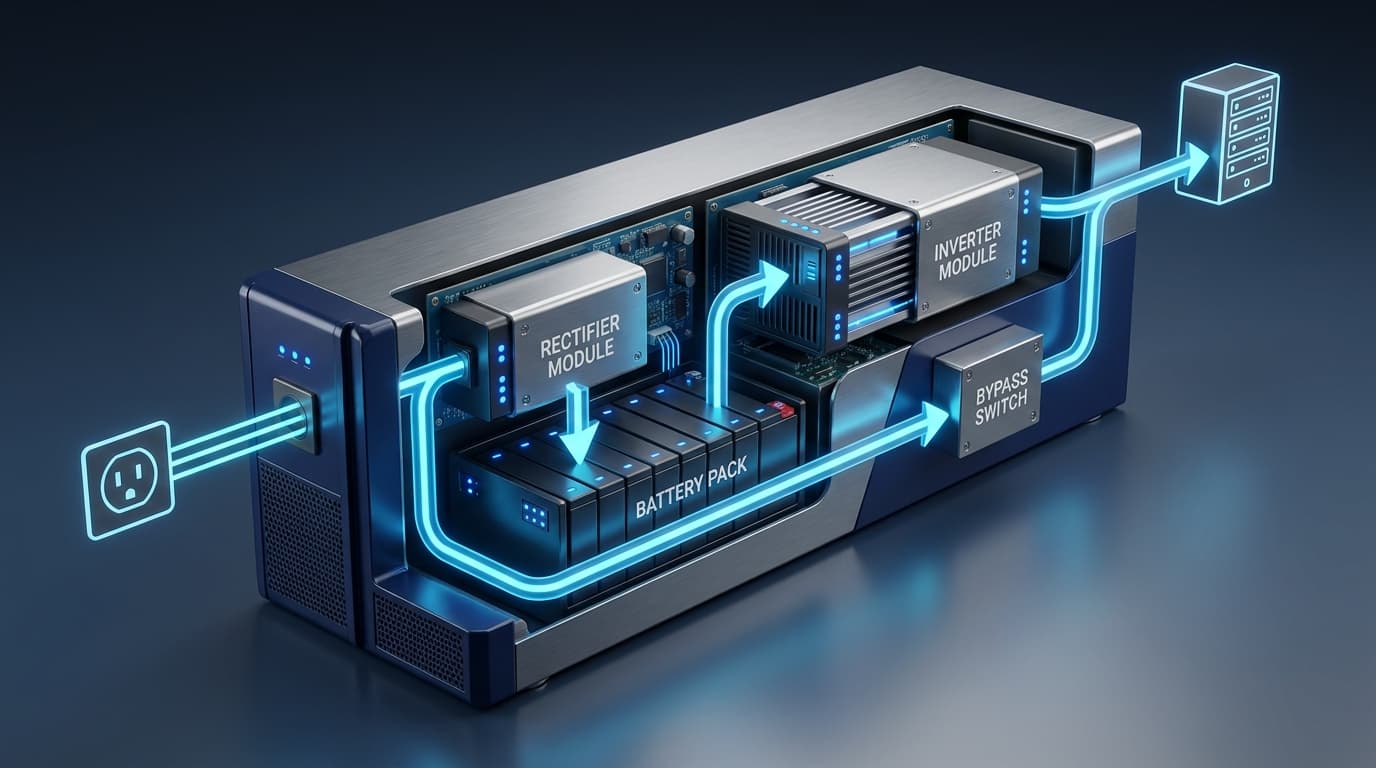
A UPS is a power protection device built around four core components: a rectifier, a battery, an inverter, and a bypass switch. Mains AC power enters the rectifier, which converts it to DC to charge the battery. When the inverter draws from the battery, it converts that DC back to AC at the voltage your equipment expects: 230V in Singapore and most of the Commonwealth, though North American units run at 120V.
What separates a UPS from a stand-by generator is speed. A generator needs seconds to start and stabilise; a UPS switches within milliseconds, before sensitive electronics register any interruption. That gap matters for equipment that can't tolerate even a momentary drop: a server mid-write to disk, a PLC controlling a production line, a monitoring system tracking patient vitals.
The bypass switch adds a second layer: if the UPS itself needs maintenance or fails, it routes mains power directly to the load rather than cutting supply entirely. Larger installations pair this with battery monitoring software that tracks cell health and flags degradation before it becomes an outage.
Types of UPS systems: online, line-interactive, and standby
UPS systems fall into three architectures, and the difference between them is how directly the battery sits in the power path.
| Type | How it protects | Response time | Typical use |
|---|---|---|---|
| Online (double-conversion) | Continuously converts AC to DC to AC; battery is always in the circuit | None (zero transfer time) | Data centres, hospitals, industrial control rooms |
| Line-interactive | Corrects minor voltage swings without switching to battery; battery engages only on full outage | A few milliseconds | Small server rooms, network equipment |
| Standby (offline) | Runs equipment on mains directly; switches to battery only when mains fails | 2 to 10 milliseconds | Desktop computers, point-of-sale systems |
Which type suits which environment?
Online systems cost more to buy and run, since the constant conversion wastes some energy as heat, but they're the only option where even a few milliseconds of dropout risks damage or data loss, which is why semiconductor fabs and hospital ICUs specify them by default. Line-interactive units strike a middle ground: cheaper to operate, and their automatic voltage regulation handles occasional brownouts without draining the battery on every dip. Standby UPS units are the cheapest and least protective, fine for a desktop PC but not for anything a business depends on.
How long does a UPS battery last?
According to Wikipedia's overview of UPS design conventions (2026), most units are built to run for 5 to 15 minutes on battery, not because manufacturers can't build longer runtimes, but because that window covers what a typical outage needs: enough time to save open files, shut down non-essential systems in the correct order, or let a backup generator spin up and take over.
Runtime scales with load and battery capacity, not with the UPS unit alone. A 1kVA unit supporting a single server might hold that load for 10 minutes; the same unit trying to carry three servers and a switch stack might last under three. If an operation needs longer coverage, say 30 minutes to complete a controlled shutdown of a full production line, that's usually solved by adding external battery cabinets rather than buying a larger UPS chassis outright.
UPS vs generator: what's the difference?
A UPS and a generator solve the same problem on different timescales, and most serious installations use both rather than choosing one.
| UPS | Generator | |
|---|---|---|
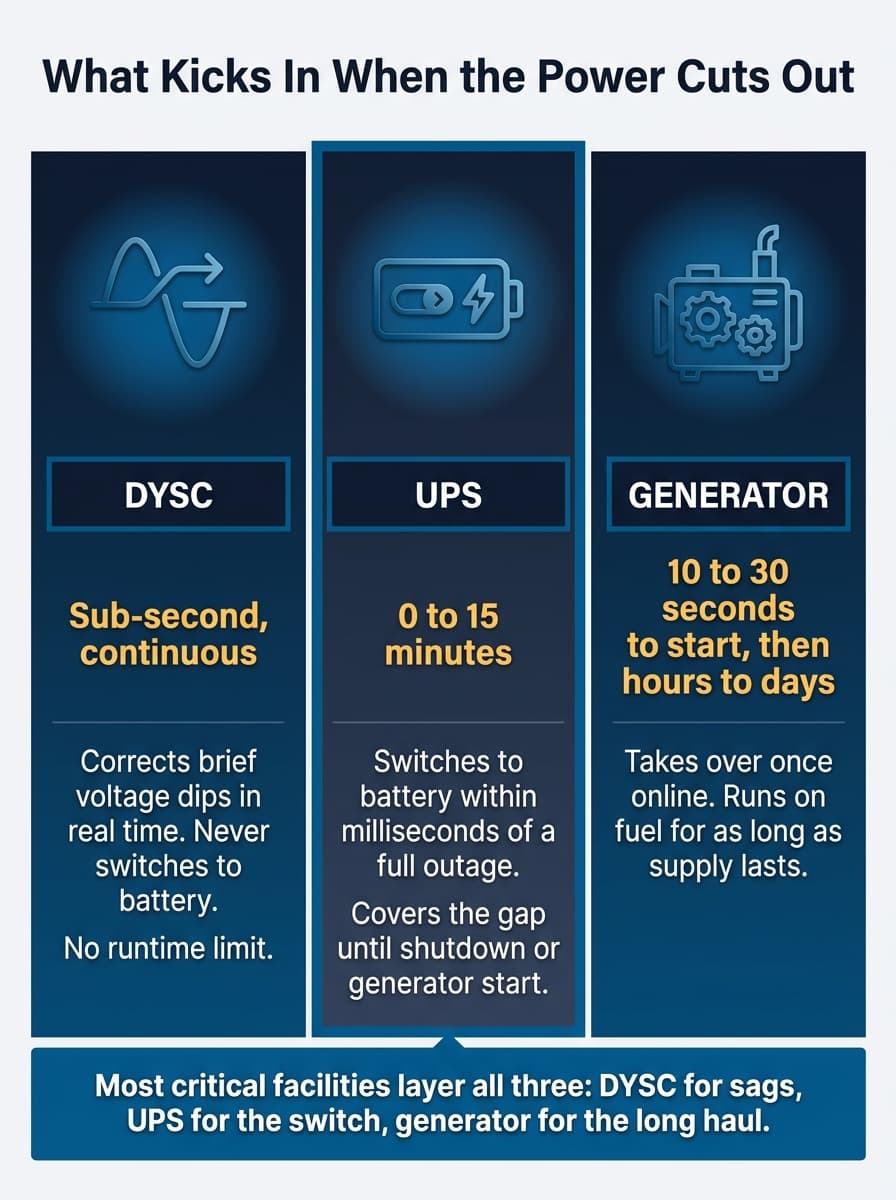
| Response time | Milliseconds | 10 to 30 seconds (automatic transfer switch) or longer (manual start) |
| Runtime | Minutes (battery-limited) | Hours to days (fuel-limited) |
| Power quality | Conditions and filters power continuously | Provides raw power only, no conditioning |
| Best role | Bridge the gap the instant mains fails | Sustain operations once the gap is bridged |
The UPS covers the instant of failure: the window where a generator's start-up delay would otherwise mean a hard shutdown. Once the generator is online and stable, it takes over the load and the UPS battery stops discharging, ready for the next interruption. Facilities that skip the UPS and rely on a generator alone still lose power for the seconds it takes the generator to start. Facilities that skip the generator and rely on a UPS alone run out of runtime the moment the battery depletes, generator or not.
Talk to an Engineer
Choosing between UPS types for a critical load?
Why power protection matters across industries
The cost of a power interruption depends entirely on what stops running.
In finance, a transaction system that drops mid-process can corrupt records that regulators expect to be complete and auditable. In healthcare, monitoring equipment and life-support systems have no acceptable downtime at all, and a UPS bridges the gap while backup generators start. In manufacturing, particularly semiconductor fabrication, even a brief voltage dip can scrap an entire production batch rather than just pausing it; voltage sags in semiconductor fabs tend to cause damage well before the lights actually go out. In IT and telecommunications, a few seconds of downtime can mean thousands of dropped connections and a support queue that takes days to clear.
Singapore's manufacturing sector has been expanding its automation footprint, which raises the stakes further: more networked, sensor-driven equipment means more single points of failure if power quality isn't managed deliberately (see Singapore's growing industrial automation base). The immediate cost of an outage is often smaller than the downstream cost: the recovery time, the batch that has to be scrapped and remade, the customer who experienced the failure directly. That's the case for treating power interruptions as a recurring risk rather than a rare event, and for mapping which systems can't tolerate downtime before choosing hardware.
That mapping exercise is also where working with someone who deals with power quality daily is more useful than the spec sheet alone.
Choosing the right UPS: sizing and key considerations
Sizing a UPS starts with total load, not equipment count. Add up the running wattage of everything it needs to protect, not the nameplate maximum, which overstates real draw, then add 20 to 25 percent headroom so the unit isn't running at its ceiling during normal operation.
From there, three questions decide the rest:
How long does equipment need to stay powered: just long enough to shut down cleanly, or long enough to bridge to a generator?
How sensitive is the equipment to voltage fluctuations, not just outright loss? Precision manufacturing and lab equipment often need the continuous conditioning an online UPS provides, where general office IT does not.
What's the physical setup: rack-mounted for a server room, tower for a standalone workstation, or a larger three-phase unit for an industrial floor?
Getting this wrong in either direction has a cost. Undersizing means the UPS trips under load exactly when it's needed most. Oversizing means paying for capacity and battery replacement cycles that go unused. Power quality problems (sags, surges, harmonics) often only become visible once a UPS or monitoring system is in place to log them, which is worth factoring into the sizing conversation from the start rather than treating it as a separate project later. Pricing depends heavily on capacity, topology, and battery configuration too, which is why serious installations are quoted against actual load and runtime requirements rather than priced off a generic list.
UPS vs DYSC: two different approaches to power protection
A UPS and a dynamic sag corrector (DYSC) solve overlapping but distinct problems, and it's worth being precise about which one is actually needed.
A UPS is built for the full range, from a brief voltage dip to a complete outage, because it can switch to battery for any interruption, however long. A DYSC is built specifically for voltage sags: the sub-second drops in voltage, often caused by a fault elsewhere on the grid or a large motor starting up nearby, that don't cut power entirely but drop it below what sensitive equipment can tolerate. DYSC systems correct that dip in real time without switching to battery at all, which means no battery replacement cycle and no runtime limit for the sag itself.
For a facility where sags are the dominant problem, such as motor-heavy manufacturing floors, semiconductor fabs, or anywhere with large inductive loads on the same feeder, a DYSC voltage sag protector can be the more targeted fix. It also tends to extend connected equipment's working life by removing repeated stress that a UPS wouldn't even register as an event worth switching for.
Neither replaces the other outright. A facility with both full outages and frequent sags typically needs both: a UPS for the moments power genuinely stops, and sag correction for the far more frequent moments it merely dips. Precicon's engineers work through this distinction with clients before recommending hardware, because specifying the wrong tool for the wrong problem, though avoidable, is a common way to overspend.
Getting the right protection in place
Choosing between a UPS, a DYSC, or both comes down to what's actually failing on the line, whether that's a full outage, a voltage sag, or both, and that's not always obvious from a spec sheet alone. Precicon has worked through this exact assessment for manufacturing, healthcare, and IT facilities across Singapore, pairing an uninterruptible power supply with the right complementary protection rather than defaulting to the biggest unit available. Beyond backup power, the same energy management systems that monitor UPS performance can flag power quality issues before they become equipment failures. Contact Precicon's engineering team to review what your equipment actually needs before specifying hardware.
Frequently Asked Questions
An uninterruptible power supply, or UPS, is a device that switches to stored battery power the instant mains electricity fails or drops below a safe level, keeping connected equipment running without interruption. It also conditions incoming power, filtering out surges and fluctuations before they reach sensitive electronics.
A UPS sits between the mains supply and your equipment, converting incoming AC to DC to charge an internal battery, then converting it back to AC to power connected devices. If mains power fails, the battery takes over within milliseconds, and a bypass switch can route power directly from the mains if the UPS itself needs servicing.
The three main types are online (double-conversion), line-interactive, and standby (offline). Online units offer continuous, uninterrupted protection at the highest cost; standby units are the cheapest and only engage once mains power fails entirely; line-interactive sits between the two.
A UPS protects against three distinct problems: complete power outages, voltage surges and spikes that can damage components, and poor quality power such as electrical noise or frequency instability. Online UPS units address all three continuously, while standby units only respond once mains power fails entirely.
Most UPS units run for 5 to 15 minutes on battery, enough to save data and shut down equipment safely or hand over to a generator. Runtime depends on the load connected and the battery capacity, so a unit supporting one server will typically last longer than the same unit supporting several.
A UPS responds within milliseconds but only runs for minutes on battery; a generator takes seconds to start but can run for hours or days on fuel. Most facilities that can't tolerate any downtime use both together, with the UPS covering the gap until the generator is online.
No. A UPS switches to battery for any interruption, brief or extended, while a dynamic sag corrector (DYSC) corrects short voltage dips in real time without ever switching to battery. Facilities with frequent sags but rare full outages often get more value from a DYSC than from oversizing a UPS.
Find the right UPS for your facility
Tell us about your facility and LKH Precicon's engineering team will get back to you.
Contact Us